
大家好!歡迎來到「Build on Google AI」工程挑戰的第 20 天。
計畫永遠趕不上變化,這就是敏捷開發(Agile)!原本今天我們要實作「安全授權機制」,但昨天 PM 看完精美的 Web 戰情室後,馬上提出了一個非常真實的痛點:「我很常在外面跑客戶,不可能隨時開著 localhost:8000。Agent 寫好企劃後,可以直接 Line 或 Telegram 傳到我手機嗎?」
這就是 Agent 邁向企業級應用的關鍵分水嶺:與外部世界互動的能力。
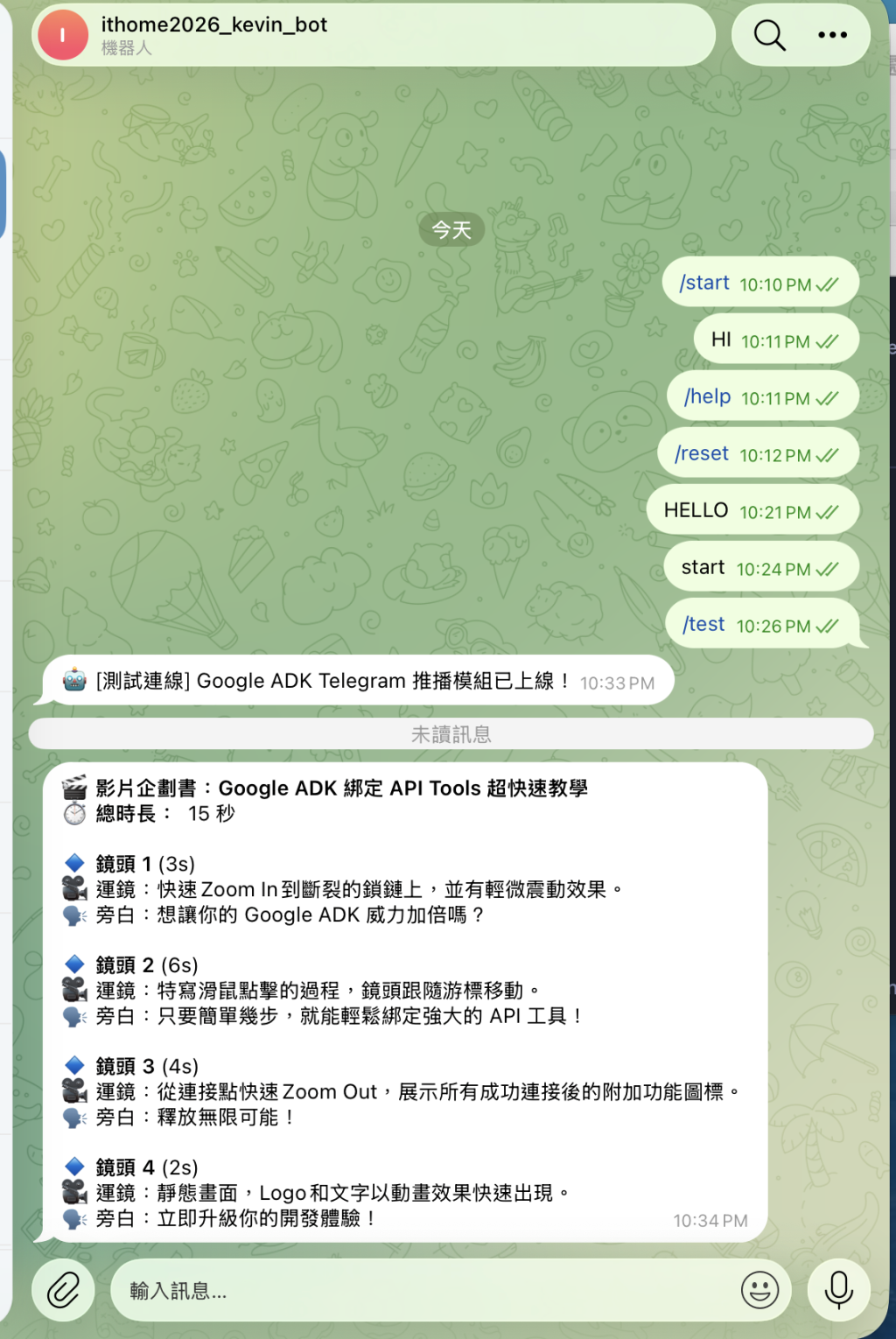
今天,我們要把原本封閉在系統內的 Agent,裝上「通訊天線」。我們將探討 Google ADK 中最強大的功能之一:工具綁定 (Tool Binding),並實作一個 Telegram 推播工具,讓 RD Agent 自動將 Markdown 草稿送到你的手機裡!
第一步:理解 ADK 的工具 (Tools) 哲學
在 Google ADK 中,Agent 不只是一個「文字產生器」,它是一個可以執行動作的「代理人」。只要你寫得出一支 Python 函式,並加上標準的 Type Hints 與 Docstring,ADK 就能在底層自動將其轉換為 OpenAPI 規格,讓 Agent 知道「何時該用、該怎麼用」。
我們不需要撰寫複雜的 Prompt 來教它怎麼發 HTTP Request,我們只需要把定義好的 Python 函式放入 tools=[...] 陣列中即可。
第二步:準備 Telegram Bot (前置作業)
在 Telegram 搜尋 @BotFather,輸入 /newbot 建立一個機器人。
取得 Bot Token (例如 123456:ABC-DEF1234...)。
傳送隨便一句話給你的機器人,然後透過 https://api.telegram.org/bot/getUpdates 取得你的 Chat ID。
第三步:完整實作程式碼 (main.py)
今天我們將前幾天的「結構化輸出」、「自我修正迴圈」、「Markdown 渲染」與今天的「Telegram 工具綁定」完美融合。這是一套可以直接投入 Production 的行動化 Agent 工作流。
import os
import requests
import logging
from typing import List
from pydantic import BaseModel, Field, model_validator, ValidationError
from tenacity import retry, retry_if_exception_type, wait_exponential, stop_after_attempt
from google.api_core.exceptions import ResourceExhausted
from google.adk import Agent

# 設定日誌
logging.basicConfig(level=logging.INFO, format='%(asctime)s - %(levelname)s - %(message)s')
logger = logging.getLogger(__name__)

# ==========================================
# [前置設定] Telegram 憑證 (實務上請放環境變數)
# ==========================================
TELEGRAM_BOT_TOKEN = os.getenv("TELEGRAM_BOT_TOKEN", "請替換為你的_BOT_TOKEN")
TELEGRAM_CHAT_ID = os.getenv("TELEGRAM_CHAT_ID", "請替換為你的_CHAT_ID")

# ==========================================
# 1. 打造 ADK Tool:Telegram 推播工具
# ==========================================
def push_to_telegram(markdown_message: str) -> str:
    """
    將文字或 Markdown 格式的草稿推播到 PM 的 Telegram 手機端。
    當企劃書或分鏡表準備好時,請呼叫此工具進行發送。
    """
    url = f"https://api.telegram.org/bot{TELEGRAM_BOT_TOKEN}/sendMessage"
    payload = {
        "chat_id": TELEGRAM_CHAT_ID,
        "text": markdown_message,
        "parse_mode": "Markdown" # 讓 Telegram 支援基本的 Markdown 渲染
    }

    try:
        response = requests.post(url, json=payload)
        response.raise_for_status()
        logger.info("📱 成功將草稿推播至 Telegram!")
        return "發送成功,PM 已在手機上收到通知。"
    except Exception as e:
        logger.error(f"Telegram 推播失敗: {e}")
        return f"發送失敗: {e}"

# ==========================================
# 2. 定義強型別與業務邏輯驗證 (沿用前幾天的基礎)
# ==========================================
class StoryboardScene(BaseModel):
    scene_number: int
    duration_seconds: int
    visual_description: str
    camera_movement: str
    voiceover: str

class VideoStoryboard(BaseModel):
    video_title: str
    target_platform: str
    total_duration_seconds: int
    scenes: List[StoryboardScene]

    @model_validator(mode='after')
    def check_duration_sum(self) -> 'VideoStoryboard':
        calculated_sum = sum(scene.duration_seconds for scene in self.scenes)
        if calculated_sum != self.total_duration_seconds:
            raise ValueError(
                f"邏輯錯誤:分鏡秒數加總 ({calculated_sum}s) 必須等於總時長 ({self.total_duration_seconds}s)。"
            )
        return self

# ==========================================
# 3. 初始化包含「通訊能力」的 Agent
# ==========================================
director_agent = Agent(
    name="director_agent",
    model="gemini-2.5-pro",
    instruction=(
        "你是一位專業的短影音廣告導演。請根據主題規劃分鏡腳本。"
        "分鏡秒數加總必須符合總時長。生成企劃後,無需人類介入,直接輸出結果。"
    ),
    response_schema=VideoStoryboard
)

# 新增一個專屬的交接 Agent,負責將結構化資料推播出去
delivery_agent = Agent(
    name="delivery_agent",
    model="gemini-2.5-flash", # 簡單的任務交接使用 Flash 即可,節省成本
    instruction="你是一個專案助理。接收到 Markdown 格式的草稿後,請務必使用工具將其推播至 Telegram。",
    tools=[push_to_telegram] # 將工具綁定給 Agent
)

# ==========================================
# 4. 例外驅動開發:自我修正與渲染
# ==========================================
@retry(
    retry=retry_if_exception_type(ResourceExhausted),
    wait=wait_exponential(multiplier=2, min=2, max=30),
    stop=stop_after_attempt(5)
)
def safe_agent_invoke(agent: Agent, prompt: str):
    return agent.invoke(prompt)

def generate_and_render(prompt: str) -> str:
    """生成、驗證、修正,並轉換為 Markdown"""
    current_prompt = prompt
    for attempt in range(3):
        try:
            storyboard_obj = safe_agent_invoke(director_agent, current_prompt)
            # 渲染為 Markdown
            md_output = f"🎬 *影片企劃書:{storyboard_obj.video_title}*\n"
            md_output += f"⏱️ *總時長:* {storyboard_obj.total_duration_seconds} 秒\n\n"
            for scene in storyboard_obj.scenes:
                md_output += f"🔹 *鏡頭 {scene.scene_number}* ({scene.duration_seconds}s)\n"
                md_output += f"🎥 運鏡:{scene.camera_movement}\n"
                md_output += f"🗣️ 旁白:{scene.voiceover}\n\n"
            return md_output
        except ValidationError as e:
            logger.warning("啟動自我修正機制!")
            current_prompt = f"你違反了系統業務邏輯。錯誤細節:\n{e}\n請修正輸出結構。"
    raise Exception("自我修正失敗。")

# ==========================================
# 5. 整合工作流:從企劃到推播
# ==========================================
if __name__ == "__main__":
    # 確保你有設定真實的 Token 才能測試成功
    if TELEGRAM_BOT_TOKEN == "請替換為你的_BOT_TOKEN":
        print("⚠️ 警告:請先設定 TELEGRAM_BOT_TOKEN 與 CHAT_ID 才能測試推播功能。")

    test_request = "幫我企劃一支 15 秒的短影音,介紹 Google ADK 如何綁定 API Tools,風格要簡潔有力。"

    try:
        print("🚀 [Step 1] 啟動導演 Agent 進行企劃與邏輯驗證...")
        markdown_draft = generate_and_render(test_request)

        print(f"\n✨ [Step 2] 企劃完成,準備交由助理 Agent 處理推播...\n")

        # 讓助理 Agent 根據拿到的草稿,決定是否使用 push_to_telegram 工具
        delivery_instruction = f"這是剛完成的企劃書,請將其傳送給 PM:\n\n{markdown_draft}"
        response = safe_agent_invoke(delivery_agent, delivery_instruction)

        print("✅ 任務完成!助理 Agent 回覆:")
        print(response.text)

    except Exception as e:
        logger.error(f"系統執行中斷: {e}")
小結
今天,我們利用 ADK 的 tools 參數,輕鬆賦予了 Agent 呼叫外部 Webhook 的能力。現在,PM 就算在計程車上,也能隨時收到 RD Agent 發來的 Telegram 訊息,審閱最新的腳本草稿。


 iThome鐵人賽
 看影片追技術